
 WordPress plugin: WP Fastest Site Search
WordPress AI Search Plugin – Fast, Typo-Tolerant & Voice-Enabled
Replace the default WordPress search with AI-powered results, autocomplete, and filters. Install in minutes. No coding required.
- Typo tolerant search
- Fast search
- Voice search

Trusted by 1000+ sites





Why WordPress's Default Search Falls Short
WordPress's native search is a basic database query. A visitor types a product name, a blog topic, or a keyword and gets irrelevant results, or nothing at all. Here is what it gets wrong.
No typo tolerance
Search "recieve" instead of "receive" and WordPress returns zero results.
No relevance ranking
Results are sorted by date, not by how well they match what the user is looking for.
No instant results
Users have to submit a form and wait for a full page reload.
No filters or facets
There is no way to narrow results by category, tag, price, or custom attribute.
No voice search
A feature visitors increasingly expect on modern websites is missing entirely.
Poor performance at scale
The more content you have, the slower and less reliable native search becomes.
This is the problem ExpertRec was built to solve.
WordPress AI Search Features
A full set of AI-powered tools for search, recommendations, and merchandising that personalize the experience and lift conversion rates.
AI Site Search
Fast, precise results powered by AI and machine learning.
Read more →Searchandising
Merchandising controls to show the right products to the right shoppers.
Read more →Personalization
Tailored shopper experiences with AI-driven recommendations.
Read more →Powerful Insights
Search analytics that show what visitors look for and what they cannot find.
Read more →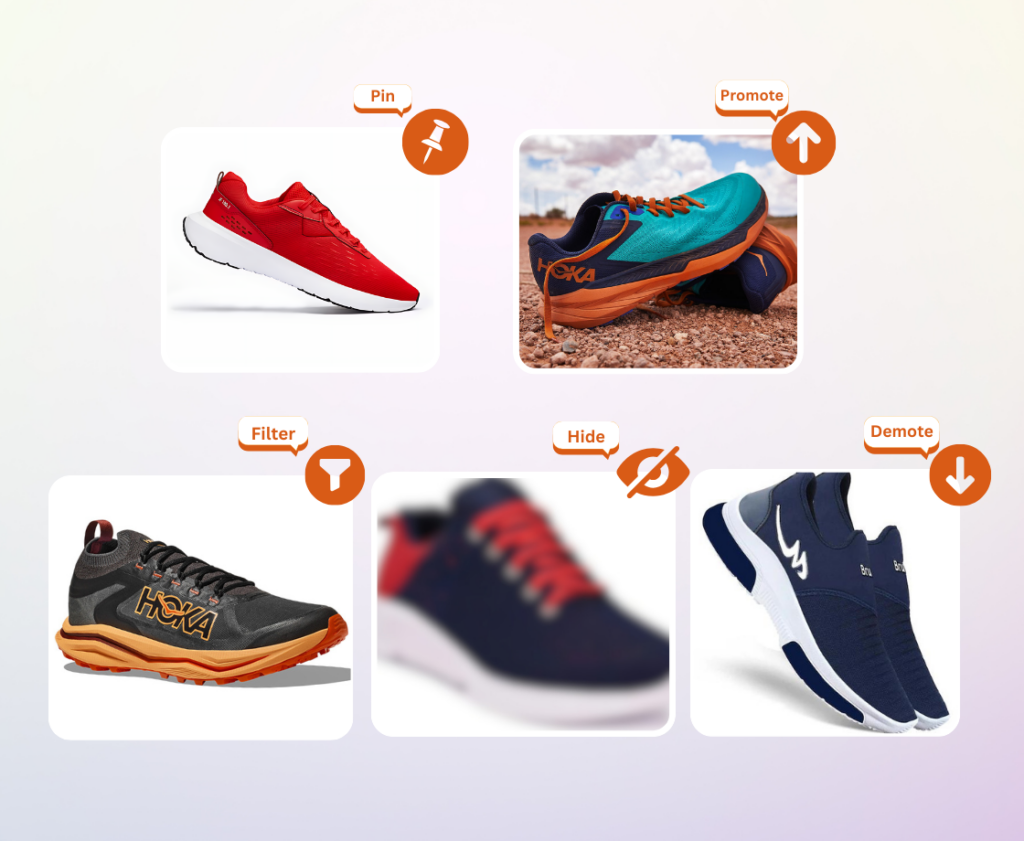
Smart Discovery Features
Tools for search, recommendations, and product placement that help each visitor find the right result faster.
Visual Merchandising
Control product placement. Highlight key items and push down outdated ones.
Filters and Facets
Help users narrow down to the right product in the least time.
Recommendations
Personalized suggestions based on user behavior and preferences.
Semantic Search
Results that match user intent and meaning, not just keywords.
How ExpertRec Compares to Other WordPress Search Plugins
| Feature | RecommendedExpertRec | Relevanssi | SearchWP | Default WP |
|---|---|---|---|---|
| Search quality | ||||
| AI-powered relevance | ✓ | – | – | – |
| Typo tolerance | ✓ | Partial | Partial | – |
| Semantic / NLP search | ✓ | – | – | – |
| User experience | ||||
| Instant / live search | ✓ | ✓ | ✓ | – |
| Voice search | ✓ | – | – | – |
| Mobile-friendly | ✓ | ✓ | ✓ | Basic |
| Filtering & discovery | ||||
| Filters & facets | ✓ | Add-on | Add-on | – |
| Works with WooCommerce | ✓ | ✓ | ✓ | Limited |
| Document search (PDF, DOCX) | ✓ | – | – | – |
| Performance & analytics | ||||
| Search analytics | ✓ | Partial | Add-on | – |
| Performance at 10,000+ pages | ✓ | Degrades | Degrades | – |
| GA4 integration | ✓ | – | – | – |
| Pricing | ||||
| Free plan available | ✓ | Freemium | Paid only | ✓ |
| Free trial | 14 days | – | – | – |
How to Install the ExpertRec WordPress Search Plugin
The ExpertRec WordPress Search Plugin (WP Fastest Site Search) replaces the default WordPress search with an AI-powered search experience in a few minutes.
Install the plugin
- Log in to your WordPress Admin Dashboard.
- Go to Plugins → Add New Plugin.
- Search for WP Fastest Site Search.
- Click Install Now.
- Once installed, click Activate.
Create your ExpertRec account
- Open the ExpertRec plugin settings from the WordPress sidebar.
- Create a new ExpertRec account with your email address.
- Verify your email address if required.
- Your website is connected to your ExpertRec search account automatically.
Index your website content
- Enter your website URL.
- Allow ExpertRec's crawler to scan your website.
- Wait for indexing to complete.
- Confirm your pages, posts, products, and categories appear in the search index.
Enable AI-powered search
Once indexing is complete, ExpertRec replaces the default WordPress search with:
- Instant search results
- Autocomplete suggestions
- Typo tolerance
- Semantic search
- AI-generated answers and summaries
- WooCommerce product search
Customize your search experience
Use the ExpertRec dashboard to configure:
- Search box design and results layout
- Synonyms and related terms
- Facets and filters
- Ranking rules
- Search analytics
- AI search and voice search
Test your search
Run a few searches using:
- Page titles
- Blog posts
- Product names
- Categories
- Common misspellings
Check that relevant results show up and visitors can find what they need quickly.
WooCommerce Search Support
If your site runs WooCommerce, ExpertRec indexes your catalog so customers find products faster.
- Product titles
- SKUs
- Categories
- Attributes
- Custom fields
- Product variations
What Our Customers Say
Fastest by far!
I have a store with 30k skus. The Expertrec team were amazing in customizing and setting up my installation. Really impressive speed, way faster than any WooCom search plugin I had tried before like Relevanssi, Woo Advanced Search & Fibo Search. Search results are basically instant even with 10s of 1000s of records.idigmarketing, WordPress.org
A totally new search experience in WP
With a lot of content all search plugins we've tried becomes slower as more content we have. With this plugin the search is fast, reliable and user friendly. Very easy to setup without any hassle and a free trial. The Customer Support is excellent and very helpful.oyondo, WordPress.org
The best search solution for WooCommerce
The UI is easy to navigate with loads of features to improve search depending on your specific needs, and the support is second-to-none. We've already seen an upturn in sales, and the bounce rate is heading in the right direction. It's been a game-changer for us.jammylad, WordPress.org
Intelligent search results in milliseconds
We have on our website more than 7 thousand articles on the most varied topics, all cataloged by categories. This plugin proved capable of performing instant and intelligent searches in milliseconds, showing results intuitively and with the necessary filters.arturscavone, WordPress.org
Great Search & Support
Bang for buck for such versatile search this is the best deal on the market with extremely good back end support and people who are committed to making the solution you need work to your requirements. Extremely fast as well.robadeedoo123, WordPress.org
Excellent search functionalities
Expertrec is great for expanding your WordPress search functionalities. It has lots of customization options and settings which can get you close to your desired result. The support is also great, they answer quickly and will do anything to solve your problem.danielb44, WordPress.org
Get Started With Our 14-day Free Trial
Standard
You are now saving 25%
- Up to 5,000 Pages
- Search Requests Up to 50K
- Voice Search
- Document Search
- Crawling pages behind login
- Search Analytics
- Filters
- Ranking Control
- GA4 Integration
- Synonyms
- Search Redirects
- Visual Pinning
- Business Rules
- Banners
- Showcase Trending Results
- Mobile Friendly
- API Support
- Ticket Support
Expert
You are now saving 20%
Everything in Standard plus:
- Up to 10,000 Pages
- Search Requests Up to 100K
- Advanced Analytics
- AI Pinning
- Live Chat Support
Enterprise
Perfect plan for your business
Everything in Expert plus:
- Theme Customizations
- Power Category Pages
- AI Personalization
- AI Site Assistant / ChatGPT Integration
- AI Page Summary
- AI Synonyms
- Results based on Geo Location
- Premium Support
Small site? There is a free plan for WordPress sites with up to 100 pages or posts.
Frequently Asked Questions (FAQ)
General Information
Do you offer a free plan?
Yes, we provide a free plan for WordPress sites, supporting up to 100 pages/posts.
Do you offer a free trial?
Yes, we provide a 14-day free trial for exploring our solutions.
What types of plans are available?
We offer SaaS plans (self-managed) and Enterprise plans (fully optimized with our support).
How do I subscribe or unsubscribe from a plan?
Use the "Payment" menu in the control panel to manage your subscription. For custom plans, contact us at support@expertrec.com.
Why does ExpertRec require an email for signup?
We use your email to identify your account and manage your data effectively.
I signed up but didn't subscribe to any plans. What will happen to my contact information and data?
Our system will automatically delete all contact details and stored data after 30 days. We do not store or share any data with third parties. For more details, please refer to our terms and conditions and privacy policy.
Will the search work after the trial period ends?
No, you will need to subscribe to a plan to continue using the search.
Installation and Compatibility
How do I install WP Fastest Site Search?
Follow the steps in the installation guide above, or read the detailed step-by-step guide.
Does this plugin power category pages?
Yes, it provides fast rendering and merchandising capabilities for category pages, along with options to configure filters and sorting at each category level using our Filter Tree.
Customization and Features
Does it support voice search?
Yes, it supports voice search on Chrome. Contact support to enable this feature.
Can I customize the search theme?
Yes, we offer UI/theme customization services as a one-time chargeable service. We provide many ready-made themes, but if you need a completely custom theme, you can avail of this service.
Can I customize the default ExpertRec theme?
Yes, a CSS editor is available under the 'UI Customizations' menu in our control panel.
Can I add enterprise features to a SaaS plan?
Yes, you can request features like AI Site Assistant, Page Summariser, ChatGPT integration, Category pages, AI personalizations, and more by contacting support@expertrec.com.
Metafields and Attribute Support
Does the plugin offer Metafields in filters?
Yes, you can include them by selecting attributes in the 'Custom Attributes' menu and reindexing.
Search Functionality
Can I search for other content besides pages and posts?
Yes, include other custom types using the 'Custom Post Types' menu.
Does the plugin provide a search shortcode?
Yes, you can use the shortcode to integrate search into specific pages.
Is the search bar mobile-friendly?
Yes, it's optimized for all screen sizes for a seamless mobile experience.
Can this plugin work with Android/iOS apps?
Yes, use our APIs to integrate and build a custom search UI for your mobile app.
Does it support document search?
Yes, we support PDF, DOCx, and XLSx search.
Does ExpertRec support multisite search?
Yes, we support multisite search. Please contact our support team for assistance with setting up multisite search configurations.
Data Security and Privacy
Does this plugin collect private data?
No, it only collects public data like products, pages, and posts. We also collect your email for communication purposes.
Is my data secure if I authorize GA4 integration?
Yes, our app is Google-approved, ensuring data privacy.
Performance and Analytics
How quickly are page updates reflected in search results?
Updates are reflected within 5 to 10 minutes.
What insights are available from ExpertRec analytics?
Gain insights into search performance, zero-results queries, typo corrections, and user behavior.
How are search requests calculated?
Requests are based on the number of Search Engine Results Page (SERP) views.
Why do I see an "Indexing Limit Reached" message?
This occurs when your plan's indexing limit is exceeded. Upgrade your plan by contacting support.
Support and Troubleshooting
What kind of support does ExpertRec provide?
We offer 24/7 support for critical issues and resolve other concerns within one business day.
Why are some features locked, and how do I enable them?
Locked features may require theme changes in your store or configuration updates on our end. Please contact support@expertrec.com to enable them.
How do I access the ExpertRec control panel?
Go to the WP Fastest Site Search Plugin Dashboard and click on "View Payment Plans."
Give your WordPress site a search that works
Install the plugin, index your content, and go live in minutes. Free for 14 days.
Install plugin